Employee Report Automation with AI-Powered Reporting
Simplify workforce reporting with intelligent employee report automation designed to collect performance data, analyze key metrics, generate reports and deliver actionable business insights. Our AI-powered solutions help businesses reduce repetitive reporting tasks, improve visibility into employee performance and make informed decisions using structured data.
With AI reporting automation, businesses can streamline daily, weekly and monthly reporting across sales, customer support, HR, finance and operations. From KPI tracking to AI-generated summaries, automated reporting makes business information easier to review and share.
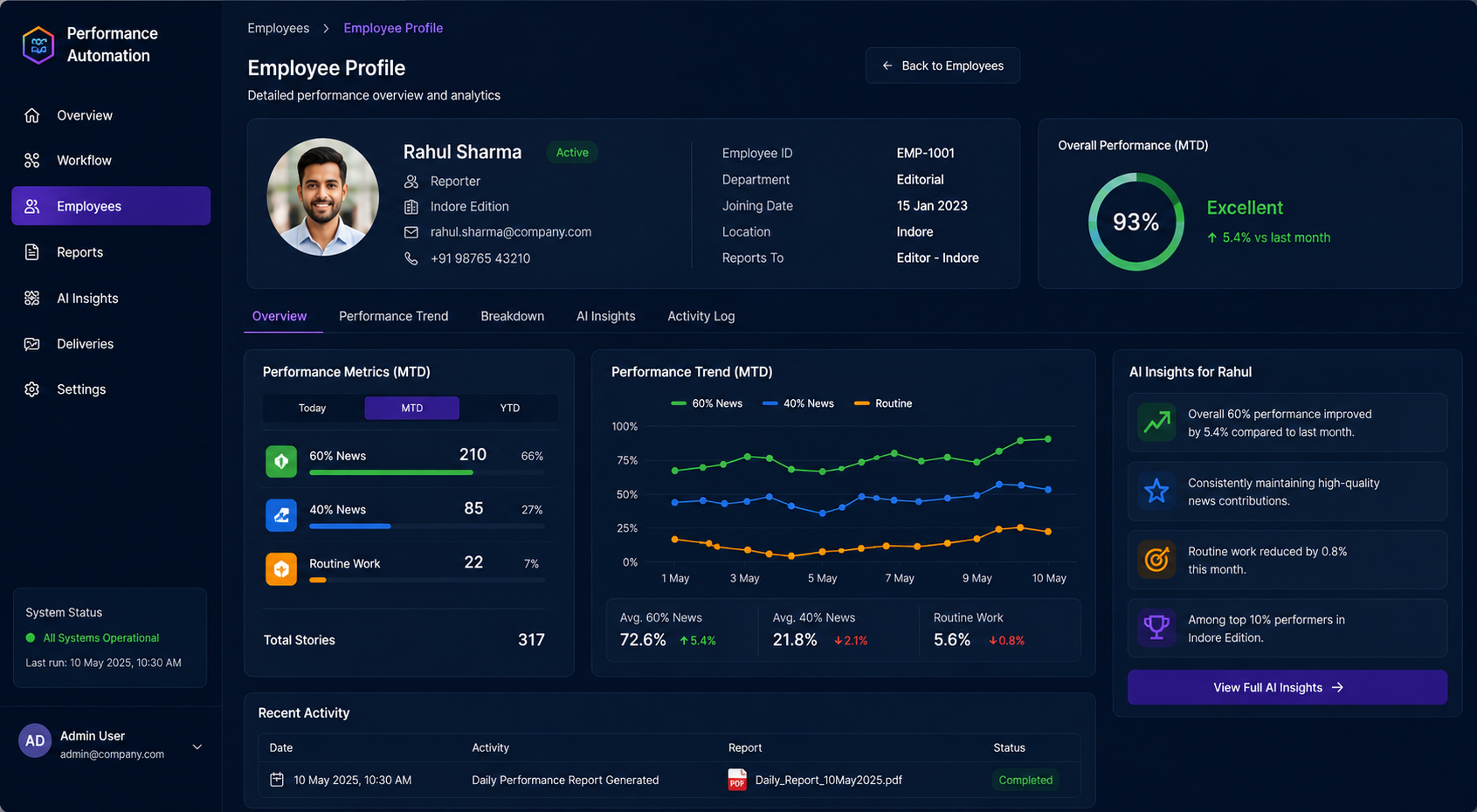
What Is Employee Report Automation?
Employee report automation uses software, workflow integrations and AI to collect employee performance data, process information and create reports with minimal manual effort.
Instead of manually combining spreadsheets and calculating performance metrics, employee report automation can retrieve approved data, standardize information, evaluate KPIs and generate consistent reports for managers and leadership teams.
By combining structured calculations with AI reporting automation, businesses can turn raw employee data into readable summaries, performance comparisons and insights that support better operational decisions across HR, marketing, and customer support.
Automated Data Ingestion
Retrieves approved files from Google Cloud Storage, CRM databases, and spreadsheets automatically without manual copy-pasting.
Standardized KPI Calculation
Evaluates individual targets, team scorecards, Today/MTD/YTD numbers using strict rules that eliminate human math errors.
AI Summaries & PDF Delivery
Gemini and OpenAI generate concise narrative observations, compile branded PDFs, and deliver them to managers over WhatsApp or SMS.
Performance Reviews
Without the Paperwork
Simplify workforce evaluation with employee report automation that collects employee achievements, monitors key performance metrics, and delivers structured review summaries. Powered by AI reporting automation, our platform eliminates manual spreadsheet collation so managers can focus on mentoring people and driving business performance.
Get Your AI Reporting SystemData-to-Document AI
Faster, smarter & always accurate
Our AI Reporting Automation Solution
Modular, enterprise-grade capabilities engineered to turn raw workforce records into executive-ready PDFs and timely management notifications.
Automated Employee Performance Reports
Generate employee performance reports using configured KPIs, targets, productivity metrics and business rules. Reports can include individual results, departmental comparisons and progress toward goals.
KPI Tracking and Performance Analysis
Monitor daily, monthly and yearly performance indicators. AI reporting automation can summarize trends, identify unusual changes and highlight areas that may require management review.
Automated PDF Report Generation
Convert processed information into consistent, branded PDF reports. Reduce repetitive formatting and help teams distribute standardized reports to relevant stakeholders.
AI-Powered Reporting Summaries
Generate concise explanations of performance trends, KPI changes and operational results. Keep AI-generated interpretations separate from verified calculations so managers can review important findings.
Scheduled Report Delivery
Automate report distribution through supported email, messaging platforms, or business applications. Configure delivery schedules and recipient rules according to department, role, or location.
Reporting Dashboard Integration
Connect employee report automation workflows with suitable dashboards and data sources to provide a clearer view of performance, targets and historical results.
Automated Employee Performance Reports
Generate employee performance reports using configured KPIs, targets, productivity metrics and business rules. Reports can include individual results, departmental comparisons and progress toward goals.
What the Workflow Does
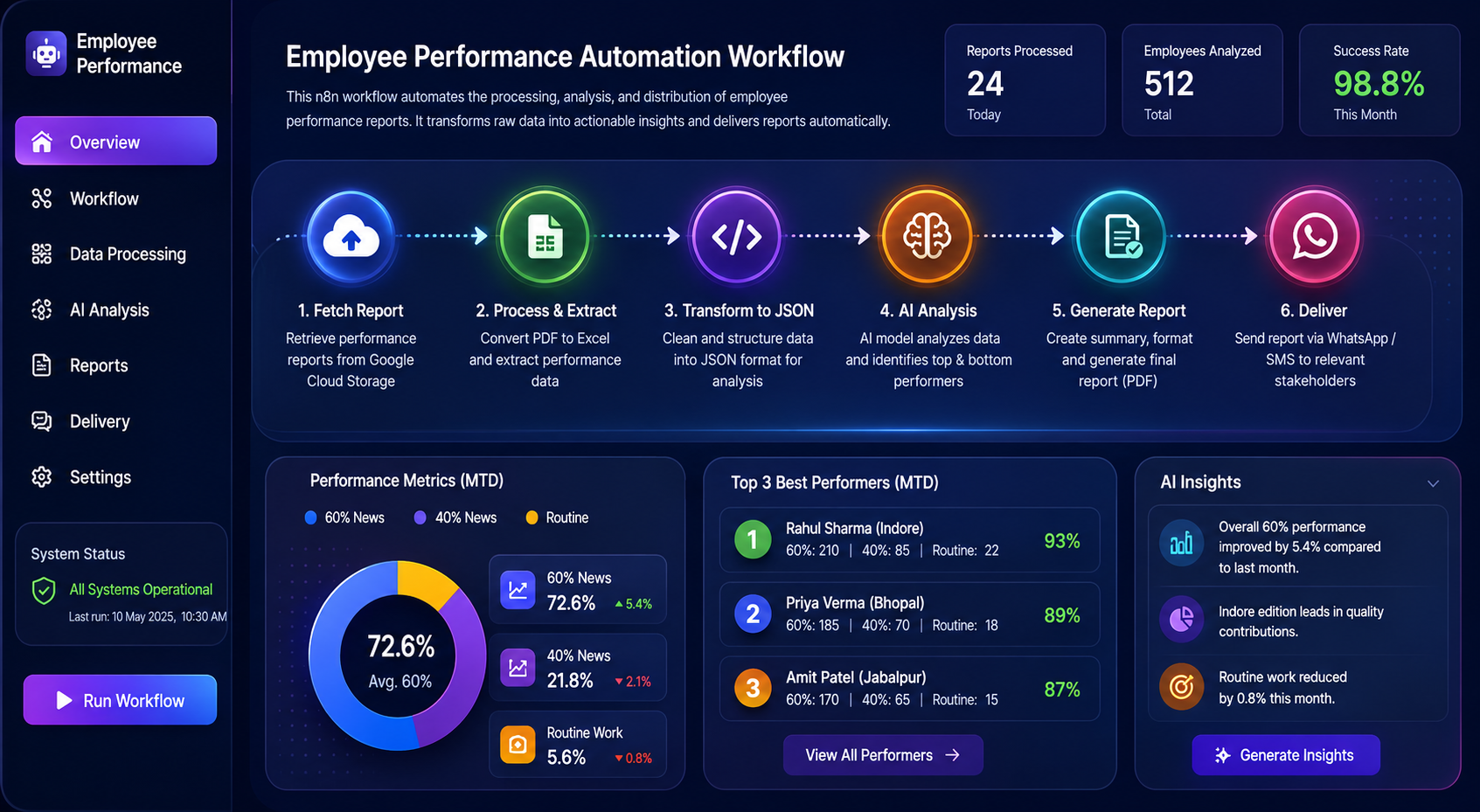
This pipeline automates the full reporting lifecycle for employee performance data.
1. Fetch Report
Retrieve performance reports from Google Cloud Storage.
2. Process & Extract
Convert PDF to Excel and extract performance data.
3. Transform to JSON
Clean and structure the data into JSON format for analysis.
4. AI Analysis
AI models analyze data and identify top & bottom performers.
5. Generate & Deliver
Generate PDF report and send via WhatsApp / SMS to stakeholders.
How It Works
Explore the detailed 12-stage engineering pipeline powering our end-to-end employee report automation solution.
Purpose of the Workflow
The workflow is designed to automate employee performance reporting with consistency, accuracy, and speed. It replaces fragmented spreadsheet handling and repetitive report preparation with a governed automation layer.
How Files Are Fetched from Google Cloud Storage
n8n monitors or retrieves source files from Google Cloud Storage buckets based on reporting schedules, naming conventions, or folder logic. This ensures the automation always works from the latest approved inputs.
How Employee Performance Data Is Processed
Incoming files are classified, validated, and routed into the correct extraction path. The system handles performance PDFs, spreadsheet exports, and structured attachments while maintaining traceable execution across each report cycle.
How PDF Reports Are Converted into Structured Data
PDF Processing and ConvertAPI are used to transform report files into machine-readable content. Where needed, XLSX Extraction is applied to tabular exports so operational metrics remain intact during conversion.
How the System Transforms Data into JSON
JavaScript transformation nodes normalize extracted fields into JSON objects. This creates a clean, predictable schema that downstream logic can use for calculations, model prompts, routing decisions, and report assembly.
How Today, MTD, and YTD Metrics Are Extracted
The workflow calculates and maps Today, Month-To-Date, and Year-To-Date performance metrics from the normalized dataset. KPI windows are aligned to reporting rules so operational leaders can compare current output with cumulative trends.
How AI Analyzes Employee Performance
OpenAI and Google Gemini are used to interpret metrics, identify meaningful performance patterns, and explain movement across KPIs. This layer adds contextual analysis rather than only presenting raw numbers.
How Top and Bottom Performers Are Identified
Ranking logic compares employees against configured scorecards, thresholds, and variance rules. The automation highlights top performers, low performers, and outliers for management review without requiring manual sorting.
How Summaries Are Generated Using AI Models
AI models generate executive summaries, employee-level observations, and manager-friendly narrative outputs. The resulting commentary is concise, structured, and suitable for enterprise reporting workflows.
How Final Reports Are Created in PDF Format
Once analysis is complete, the system renders formatted report payloads into branded PDF outputs. This provides a consistent, distributable document for leadership teams, operations, and department heads.
How Reports Are Distributed Using WhatsApp and SMS APIs
REST APIs connect the workflow to WhatsApp API and SMS Gateway APIs so final reports can be pushed automatically to stakeholders. Distribution rules can support instant delivery, scheduled dispatch, and escalation-based messaging.
How Conditional Routing Works by Department and Location
The automation applies conditional routing logic to determine which teams receive which reports. Department, location, role, or reporting hierarchy can all be used to send tailored outputs to the correct audience.
Analytics & Performance Dashboards
Gain complete visibility into your operations. Our automated dashboards present employee achievements, target progressions, and detailed breakdown analytics in real-time.
Advanced Performance Metrics
Track scores, target hit rates, and departmental rankings using a highly visual grid that simplifies performance appraisals.
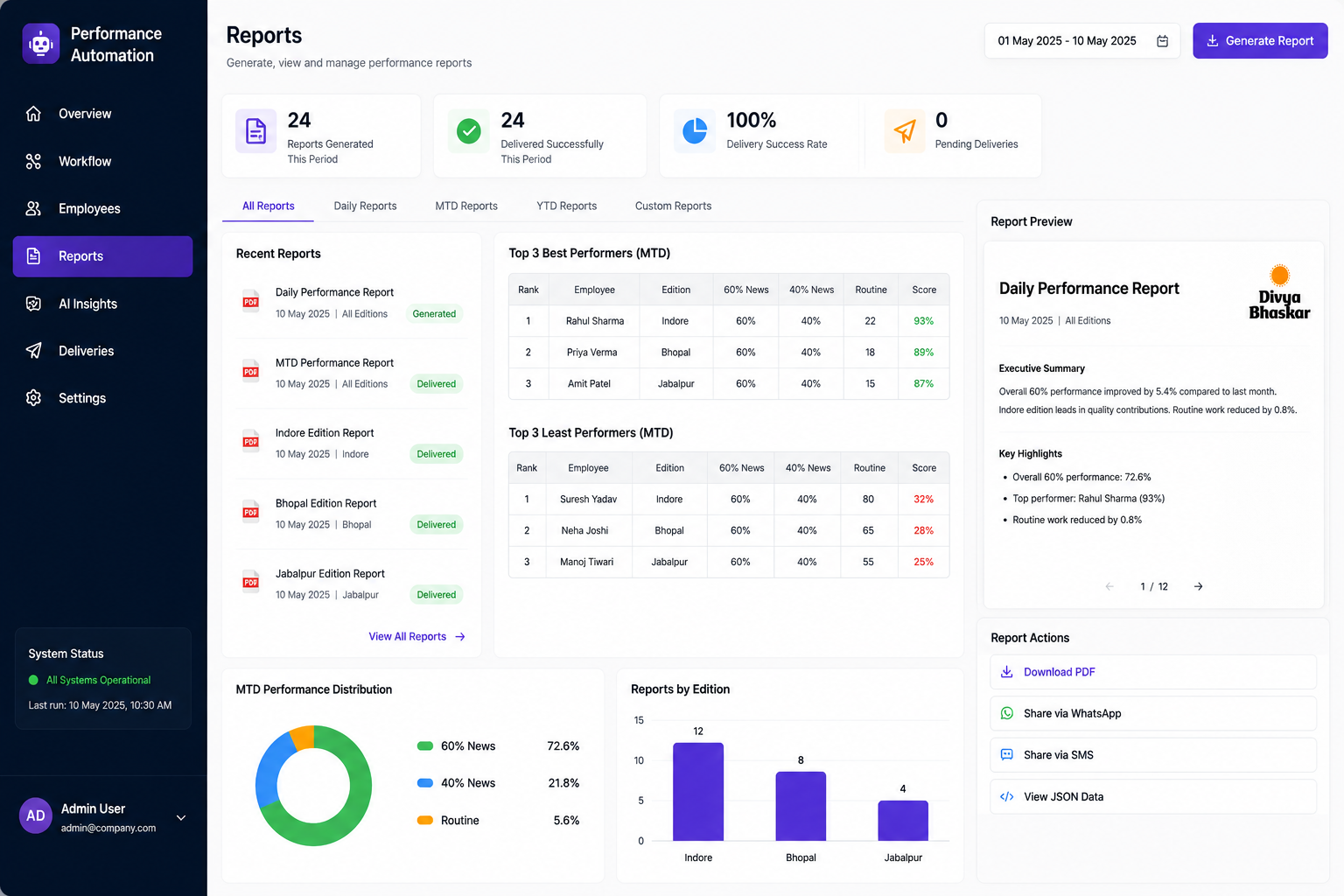
Comprehensive Performance Overview
Access consolidated summaries, individual KPI progress bars, and historical comparisons to make informed management decisions.
Technologies Used
The workflow combines orchestration, storage, AI models, document conversion, API integrations, and structured transformation layers to support enterprise-grade automation.



Benefits of AI Reporting Automation
Implementing AI reporting automation can help businesses:
Eliminate Manual Data Entry
Reduce repetitive report preparation and data entry across management and HR teams.
Standardized Performance Reporting
Standardize employee performance reporting with governed mathematical logic that eliminates human calculation errors.
Efficient KPI & Target Tracking
Track KPIs and business targets more efficiently with unified daily, month-to-date, and year-to-date scorecards.
Early Trend & Issue Detection
Identify trends and potential performance issues earlier using automated anomaly detection and threshold alerts.
Timely Management Insights
Improve access to timely management insights with AI-generated executive summaries and department overviews.
Consistent Multi-Department Delivery
Deliver reports consistently across departments, automatically routed by office, team, or seniority.
More Time for People & Coaching
Give managers more time to review results, mentor staff, and support employees instead of assembling spreadsheets.
The actual benefits depend on data quality, workflow design, integrations and the accuracy of reporting rules.
Employee Report Automation Use Cases
Tailored reporting automations designed for departments across sales, HR, customer service, and operations.
Sales and Revenue Reporting
Track sales targets, employee performance, lead activity and collections across teams.
HR and Workforce Reporting
Prepare structured summaries of approved workforce metrics, attendance data and departmental performance indicators.
Customer Support Reporting
Summarize ticket resolution, response times, customer feedback and support team KPIs.
Operations Reporting
Monitor operational targets, completed tasks, productivity metrics and workflow exceptions.
Management and Executive Reporting
Deliver consolidated performance summaries to managers and leadership teams for regular business reviews.
Why Choose Movya for Employee Report Automation?
Movya helps businesses streamline reporting workflows with tailored automation solutions designed around their data, performance metrics and operational needs.
Our employee report automation solutions can combine data collection, KPI calculations, AI-generated summaries, PDF creation and automated delivery into one connected workflow.
Adapt reporting to your business processes and KPIs.
Turn performance data into clear, reviewable summaries.
Share reports through supported business channels.
Connect compatible data sources and business applications.
Extend workflows across teams, departments and locations.
With the right implementation, AI reporting automation can make recurring reports easier to prepare, review and distribute.
Frequently Asked Questions
Everything you need to know about setting up automated workforce analytics and KPI reporting.
Need custom reporting metrics or bespoke database integrations for your company?
Contact our Reporting Automation Engineering Team